Inventory & stock management software with lot-level truth.
Know what is on hand, what it cost and which consignment it came from — down to the individual batch. Royal trading tracks every gram through receipt, valuation, allocation and dispatch, and keeps the ledger that proves it.
A stock number nobody quite believes
Most trading businesses do not lack data — they have too much of it, in too many places, and no way to reconcile it.
Stock in a spreadsheet
- One row per product — batches collapse into an average nobody can unpick
- A quality complaint takes a day of phone calls to trace
- Cost price is whatever the last invoice said
- Expiring goods are found during a stock-take, not before
- An edited order and the stock figure quietly disagree forever
Stock in Royal trading
- Every batch is its own lot, with its own quantity and cost
- Any dispatch traces back to the purchase order that supplied it
- Moving-average cost recomputed on every receipt
- Lots expiring within 30 days surface on the dashboard
- Editing an order reconciles the movement instead of duplicating it
The life of a consignment
Nothing here is a separate stock app you have to keep in sync. Inventory is the ledger sitting between your purchasing and your sales.
1. Receive
Receiving a purchase-order line opens a new lot or tops up an existing one.
2. Value
The lot’s moving-average cost is recomputed from the receipt’s price.
3. Allocate
Sales-order lines pick the lot they ship from — new stock or old.
4. Dispatch
The issue is posted, attributed FIFO to the receipts it consumed.
5. Reconcile
Later edits adjust the existing movement, so paperwork and stock agree.
Every one of those steps writes to the same movement ledger — which is why the stock figure, the valuation and the documents can never tell three different stories.
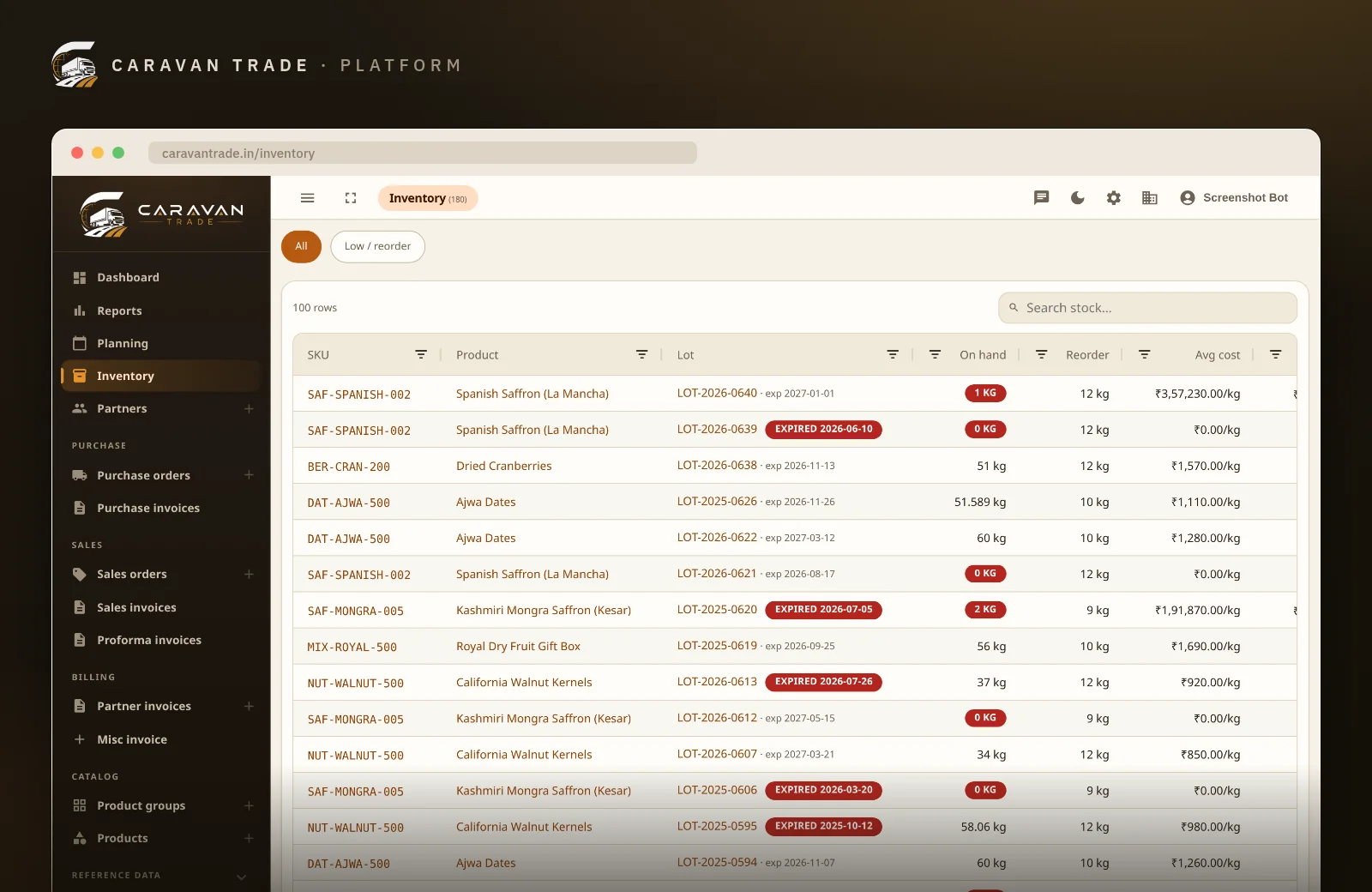
Stock held per batch, not per product
Two sacks of the same SKU bought two months apart are not the same stock — different supplier, different cost, different shelf life. Royal trading keeps them as separate lots, each with its own quantity, its own average cost and its own history, while still showing you the product-level total.
- Supplier lot / batch number captured on receipt
- Manufacturing and expiration dates per lot
- A human label for the lots your team talks about by name
- Lot identity frozen from the purchase-order line that opened it
- Product view rolls every lot up into one on-hand figure
A cost price you can defend
Every goods receipt into a lot recomputes that lot’s moving-average unit cost, so valuation follows what you actually paid rather than whatever the most recent invoice happened to say. Issues draw down at the prevailing average; deliberate revaluations are posted as their own movement so the change is visible, not silent.
- Moving-average cost maintained per lot, in minor units — no rounding drift
- Stock value per lot, per product and across the warehouse
- Explicit revaluation when a landed cost arrives late
- Multi-currency aware, so imported stock is valued in the currency you bought it in
- Margin visible against the sale, because cost and price live in one system
Every gram, back to the consignment it came from
The movement ledger records every receipt, issue and adjustment. When stock is issued, Royal trading works out first-in-first-out which earlier receipts it consumed and stores that breakdown on the movement — so a customer complaint about a specific delivery resolves to a specific supplier consignment, with dates, in seconds.
- In / out / adjustment movements, each with its source document
- FIFO source attribution stored on the issue itself
- A lot’s page lists the purchase orders in and the sales orders out
- Forward trace (“who got this batch?”) and backward trace (“where did this come from?”)
- Nothing is edited in place — corrections are movements too
Find out before your customer does
Each lot carries a reorder level. Anything at or below it is counted and surfaced on the operations dashboard next to your approvals and receivables, together with lots expiring inside the next 30 days — so replenishment and clearance decisions are made from the screen you already open every morning.
- Per-lot reorder level with a low-stock count on the dashboard
- Lots expiring within 30 days flagged automatically
- “Low / reorder” filter on the inventory grid for a working list
- Feeds straight into raising the next purchase order
Stock value, movement and concentration — live
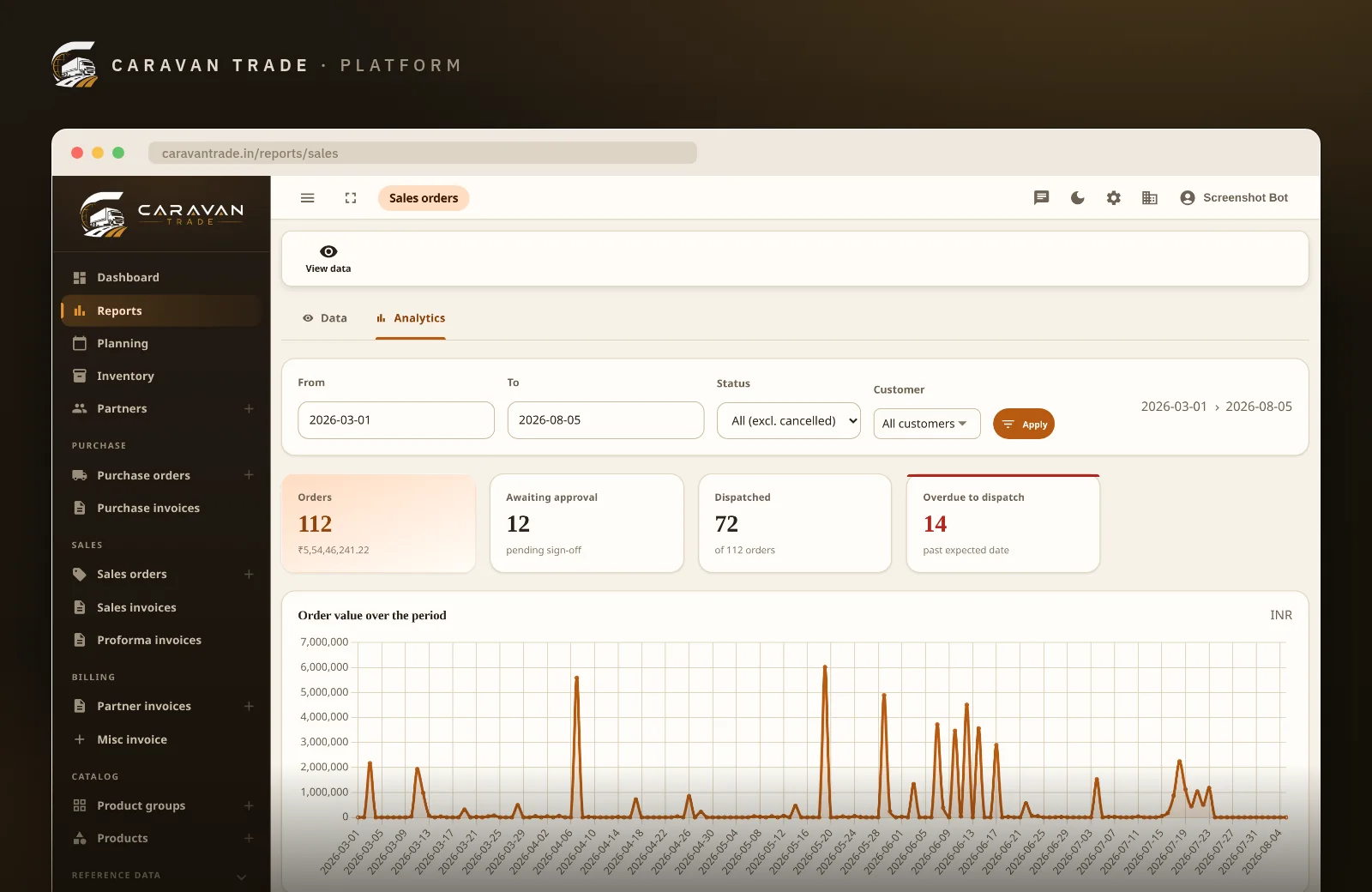
The inventory report comes in two views over the same filtered data: a grid when you need the rows, and analytics when you need the shape. Both are current the moment you open them, and both export to CSV so your accountant works from the same numbers you are looking at.
- Total stock value, products and lots tracked
- Low-stock and expiring-lot counts
- Received vs issued over time, in kilograms
- Top products by value — where your money is sitting
- Filterable grid with CSV export
“Batch and lot tracking alone paid for itself — we can trace every consignment back to the supplier in seconds.”
See it on your own stock. Book a 30-minute demo — no credit card, no obligation.Built for goods sold by weight
Most inventory systems assume you sell countable pieces. Trading businesses rarely do — so the arithmetic here starts from weight.
- Grams are canonical
- Stock, receipts and issues are stored in grams, the smallest unit you trade in. Every figure you see is derived from an exact integer, so repeated part-shipments never accumulate rounding error.
- Enter g or kg
- Type 250 g or 12.5 kg — whichever matches the paperwork in front of you. Fractional weights are first-class, not a workaround.
- Money in minor units
- Costs and values are held in paise and formatted for Indian grouping on the way out, so valuation totals reconcile to the rupee.
- Multi-currency
- An imported lot keeps the currency it was bought in, so landed cost is honest and conversion is a reporting decision rather than a lossy one made at receipt.
- Extra fields, your names
- Need grade, moisture, origin estate or a container number on every lot? Add your own fields per business unit without waiting for a release.
The complete capability list
No feature tiers hiding traceability behind an upgrade. This is what the inventory module does.
Stock records
What the system knows about the goods on your floor.
Movements
The ledger every number on the page is derived from.
Valuation
What the stock is worth, and why.
Control & insight
Seeing it, sharing it and keeping it safe.
Inventory is wired into the rest of your trade
Stock is only trustworthy when it is a consequence of your real documents rather than a separate register somebody remembers to update.
Purchase orders
Approve, receive and let the receipt open or top up the lot — no re-keying.
Sales orders
Lines choose the lot they ship from, so allocation is a decision you can review.
Invoicing
Invoice the whole order or line by line, with GST/HSN handled and no double-billing.
Reports
Inventory, purchase, sales, P&L and position views over the same live data.
Analytics assistant
Ask questions in plain English and get the figures, with the query shown.
Partners
Suppliers, customers, transporters and brokers, each with GST details and terms.
Multi-subsidiary
Run several business units from one login, each with its own documents.
Users & permissions
Composable permission groups — approving is not the same as managing.
Trades where the batch matters
If your goods have a supplier lot, a grade or a shelf life, product-level stock was never going to be enough.
Dry fruits, nuts & spices
Grade and origin vary per consignment, and moisture loss is real. Lot costing keeps margins honest.
Wholesale distribution
High volumes, thin margins, constant part-shipments — exactly where spreadsheets start drifting.
Import & export
Multi-currency landed cost, late freight invoices and documentation that must match the goods.
Food processing & packing
Bulk in, packed out, with the batch number that has to appear on the pack.
Gifting & hamper brands
Seasonal peaks against shelf life — see what is expiring while you can still sell it.
Any goods with lot identity
Carpets, textiles, chemicals, agri commodities — anywhere a batch has its own story.
Less counting, more trading
“We used to close a stock-take over a weekend. Now the ledger already agrees with the floor, so it is an hour of spot checks.”
“A buyer queried one delivery. Two clicks and we had the supplier, the lot and the receipt date. That conversation used to take a day.”
“Knowing the real average cost per batch changed how we quote. We stopped guessing our own margin.”
Live on your own stock in three steps
You do not need a clean slate. Most businesses start from whatever their current stock sheet says.
Load your catalogue & opening stock
Products, SKUs and current on-hand quantities go in as opening balances — with lot identity where you have it.
Run purchasing through the system
From the first PO, receipts open lots and costs build themselves. Your stock stops being maintained by hand.
Turn on alerts & reports
Set reorder levels, hand your team the permissions they need, and work from the dashboard each morning.
Questions traders actually ask
What kind of business is this inventory module built for?
Wholesalers, distributors, importers and exporters who buy and sell physical goods in bulk — typically by weight — and need to know exactly what is on hand, what it cost and which consignment it came from. It is not a retail point-of-sale system.
How does batch and lot tracking work?
Stock is held per lot, not just per product. Each lot carries the supplier’s lot or batch number, manufacturing and expiration dates and an optional label, frozen from the purchase-order line that opened it. A product’s on-hand figure is the sum of its lots, and you can open any single lot to see its own quantity, cost and history.
How is stock valued?
Each lot keeps a moving-average unit cost that is recomputed on every goods receipt into that lot. Stock value is quantity on hand × average cost, rolled up per product and across the whole warehouse. You can also revalue a lot deliberately when a landed cost lands late.
Can I see which purchase order a dispatched consignment came from?
Yes. Every issue is attributed back to the receipts it draws from, first-in-first-out, and the breakdown is stored on the movement itself. A lot’s page lists the purchase orders that fed it and the sales orders that drew from it, so a customer complaint can be traced to a supplier consignment in seconds.
Does it handle fractional weights like 12.5 kg?
Yes. Weight-based goods are tracked in grams as the canonical base unit, so you can enter 12.5 kg or 250 g and the arithmetic stays exact — no rounding drift creeping into stock or valuation.
How do I know when to reorder?
Every lot has a reorder level. Anything at or below it is flagged as low stock on the operations dashboard and can be filtered in the inventory grid, alongside lots expiring within the next 30 days.
What happens to stock when someone edits an order after it was received?
The receipt is reconciled rather than duplicated: the stock movement is adjusted to match the corrected line, so quantity on hand and valuation stay in step with the paperwork instead of drifting apart.
Can I correct a physical count difference?
Yes. Stock adjustments are first-class movements with a reason, so a stock-take correction is recorded in the ledger and auditable later — it never silently overwrites a number.
Can I export inventory data?
The inventory report has a data grid and an analytics view, both filterable, and exports to CSV — so your accountant or your own spreadsheet models can have the same figures you are looking at.
Does the whole team see cost prices?
Only if you let them. Access is governed by composable permission groups, so warehouse staff can be given stock visibility without cost and valuation figures.
Does my data sit alongside other customers’ data?
No. Every customer gets their own database — your stock ledger is physically separate, not a tenant column in a shared table.
Can I ask questions in plain English?
Yes. The built-in analytics assistant answers questions like “which products are below their reorder level?” against your own data, and shows you the figures it used.
Where to go next
The whole platform
Purchasing, sales, invoicing, partners and reports — the system inventory sits inside.
See every module →Pricing
Straightforward plans with traceability included, not gated behind a tier.
View pricing →Wholesale & B2B
How partner pricing, approvals and lot-tracked fulfilment work together.
Read more →See your own stock, lot by lot
Thirty minutes, your products, your batches. We will walk a consignment from purchase order to dispatch and show you the trace at the end of it. We usually reply within one business day.
Already a customer? Log in to your back office.